Reminder: Office Hours are available Wednesdays and Fridays to get your questions answered 

logo
  • Home
  • Quick Guides
  • User Guide
  • Video Library
  • Release Notes
  • Downloads
  • Support Ticket
  • FAQs
  • Search

Journal Tagging - OCO, Trailing Stops, etc.

December 23, 2025
|In Portfolio, Account, Journal, Trading
|By Support Team
Journal Tagging – OCO, Trailing Stops, etc.
  1. Home
  2. Location
  3. Portfolio
  4. Journal Tagging – OCO, Trailing Stops, etc.

User Guide

  • Home
  • Navigation
  • The Score
  • Watch List
  • Charts
  • Find
  • Heat Map
  • Options – Overview
  • Options – Strategies
  • Options – Advanced
  • Options – Backtest
  • Mobile – Under Construction
  • Trading
  • Journal

Main Menu

  • Home
  • Quick Guides
  • User Guide
  • Video Library
  • Release Notes
  • Downloads
  • Support Ticket
  • FAQs

OCO Journal Tagging

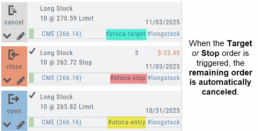
OCO Orders are automatically tagged in the Journal.

Once the Stock Order is Executed (it is an active Position),  the Limit and Stop orders are Live (active Orders for the duration selected: Day or GTC.)

If/when the stock hits the Limit price, that order will execute, and the Stop order will be canceled.  The Journal tab will be green and display a Gain/Profit.
-OR-
If/when the stock hits the Stop price, that order will execute and the Limit order will be canceled.  The Journal tab will be red and display a Loss.
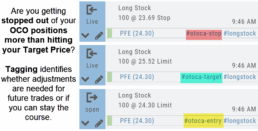
The tagged results show whether you’ve been hitting your target or getting stopped out.
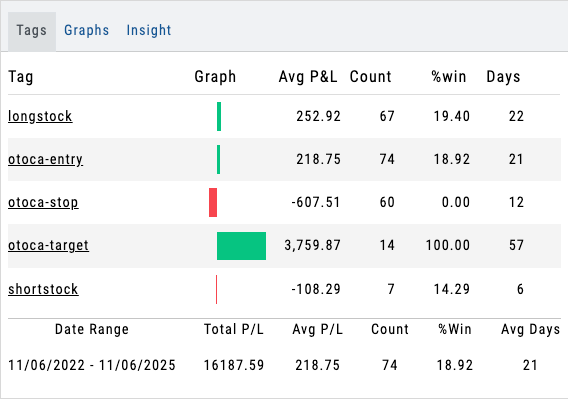

**Note:  Past Conditional trades will be tagged as “otoca-entry”, “otoca-target” and “otoca-stop”.

autotagging journal OCO stop orders trading virtual account
  • Prev
  • Next

Main Menu

  • Home
  • Quick Guides
  • User Guide
  • Video Library
  • Release Notes
  • Downloads
  • Support Ticket
  • FAQs

User Guide

  • Home
  • Navigation
  • The Score
  • Watch List
  • Charts
  • Find
  • Heat Map
  • Options – Overview
  • Options – Strategies
  • Options – Advanced
  • Options – Backtest
  • Mobile – Under Construction
  • Trading
  • Journal
© 2025 Trade Tool Support. All rights reserved