
Watch Page
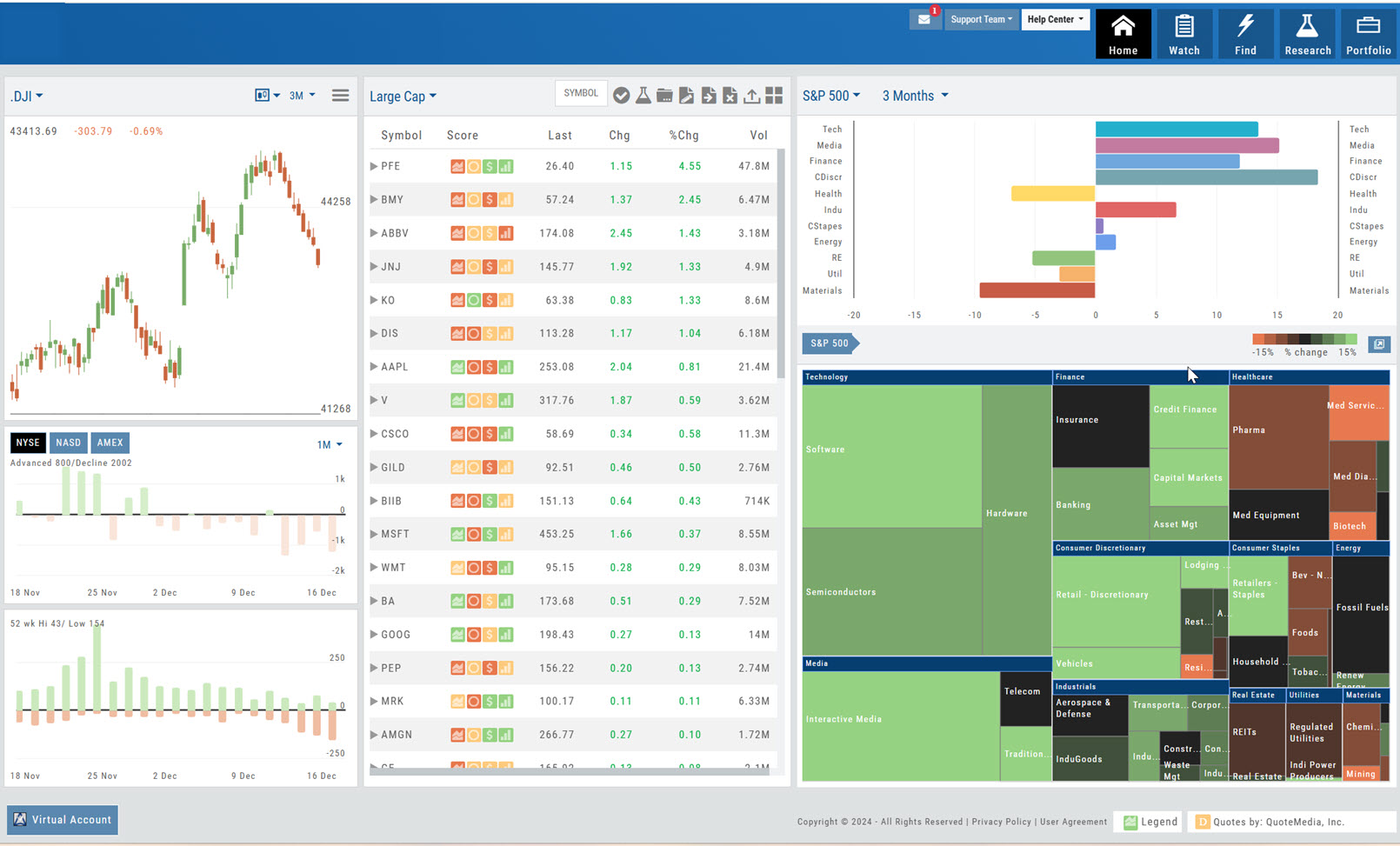


Platform Features Release: March 2023
Announcing the latest features/functions updates, additions, or edits to the trading platform: Valuation and Fundamental Data Points added Users have [...]
Posted in Research, Watch, Find, Release Notes, Screener, Functionality, Watch List, Find, Trading
Tagged research, data points, customize, watch lists, screener, views
Comments Off on Platform Features Release: March 2023
Platform Features Release: December 2022
Announcing the latest Release which added a powerful Lower Indicator on the Charts Tab: 52 Week Hi/Lo. Price/Date info has [...]
Posted in Watch, Portfolio, Positions, Activities, Release Notes, Functionality, Watch List, Trading
Tagged journal, analyzing, customize, watch lists, watchlists, Accounts, views
Comments Off on Platform Features Release: December 2022
Platform Features Release: November 2022
Announcing the latest Release allowing for customized Watchlist views. Improvements in Journal functionality will increase responsiveness and allow users to [...]
Posted in Watch, Portfolio, Positions, Activities, Release Notes, Functionality, Watch List, Trading
Tagged journal, analyzing, customize, watch lists, watchlists, Accounts, views
Comments Off on Platform Features Release: November 2022
Customize Watchlist Views
Customize Watchlist Views You have the ability to customize Watchlist Views – based upon criteria you want to see. Click [...]
Posted in Research, Location, Watch, Stock Research, Dashboaard, Functionality, Watch List
Tagged functionality, research, dashboard, watch lists
Comments Off on Customize Watchlist Views
Platform Features Release: Additional Alert Functionality, Watch List Alerts, Info Button, Trade from Charts
Features Release Notes: Additional Alert Capability, Set Watchlist Alerts, Alert Management Info Button, New Trade Button on Charts Announcing: Expanded [...]
Posted in Watch, Release Notes, premium, alerts, Functionality, Trading
Tagged trading, charts, research, Premium, alerts, watchlists
Comments Off on Platform Features Release: Additional Alert Functionality, Watch List Alerts, Info Button, Trade from Charts
Alert Functionality (Premium Desktop Feature)
Alert Functionality Alerts can greatly improve trading effectiveness by notifying you on a potential trade opportunity and help you decide [...]
Posted in Research, Watch, Account, Stock Research, premium, alerts
Tagged account, notes, trade management, trade account, Premium, alerts, watch lists
Comments Off on Alert Functionality (Premium Desktop Feature)
Custom (Premium Desktop Feature)
Custom Page – Customize What You Want To See Custom Page You’ll find Custom under the Home tab (formerly Market [...]
Posted in Watch, premium, Trade Central, news, Charts
Tagged news, Premium, Trade Central, Charting
Comments Off on Custom (Premium Desktop Feature)
List or Tile View
View any list in traditional List View or Tile View —both show The Score. Tile View shows thumbnail charts of [...]
Posted in Watch, Functionality, Watch List
Tagged navigation, How to, watch list
Comments Off on List or Tile View
Create Watchlists
The Market & Watch Tab Icon ToolBar allows you to Create/Modify/Manage your Lists. Hover your cursor over the icon to view [...]
Posted in Watch, Watch List
Tagged navigation, menu, How to, watch list, find, market, scans, calendar, watch
Comments Off on Create Watchlists
Icon Navigation
More than a picture, icons will help guide you through the trading process. This graphic shows the function of some [...]
Posted in Watch, Navigation, Functionality, Watch List
Tagged navigation, menu, How to
Comments Off on Icon Navigation
Tile View Sizes
Tile View is available in 3 sizes on the Market or Watch Tabs. Scans and Earnings/Dividends Calendar under the Find tab [...]
Posted in Market, Watch, Find, Scans, Calendar, Functionality, Watch List
Tagged navigation, How to, watch list, find, market, scans, calendar, earnings, dividends
Comments Off on Tile View Sizes
Smart Action Icon
The Smart Action Icon adjusts available features depending upon where you are in the trading platform. For Stocks you can [...]
Sending from One “List” to Another
You can send symbols from any list, including Find, Explore, Actives, to your Watch lists — including from one watch [...]
Posted in Watch, Watch List
Tagged navigation, How to, watch list, research, icons
Comments Off on Sending from One “List” to Another
Don’t Know the Symbol?
No Problem You can search for symbols from several entry points including “Market” and “Watch”. Simply start typing all or [...]
Posted in Research, Watch, Stock Research, Watch List
Tagged menu, How to, research, market, symbols, watch
Comments Off on Don’t Know the Symbol?
Multi-Select Stocks
Multi-select lets you choose a group of stocks. Once selected you can go to research, send to another list, create [...]
Posted in Watch, Watch List
Tagged navigation, menu, How to, watch list
Comments Off on Multi-Select Stocks
Heat Maps Too
The Heat Maps on the Market page offer the ability to drill down to the stock level. You are able [...]
Posted in Location, Watch, Uncategorized, Watch List
Tagged navigation, menu, How to, watch list, heat maps
Comments Off on Heat Maps Too